This is a global announcement. This is a global announcement. This is a global announcement. This is a global announcement. This is a global announcement.
Learn More >>

There are a number of ways to get analytics data from your LeadPages that you generate from LeadPages.com. Here's a way to add your own Google Analytics data to your LeadPage:

2. Then navigate to the Analytics tab:

3. Leave the tracking ID section blank, and add your custom code to the box below:
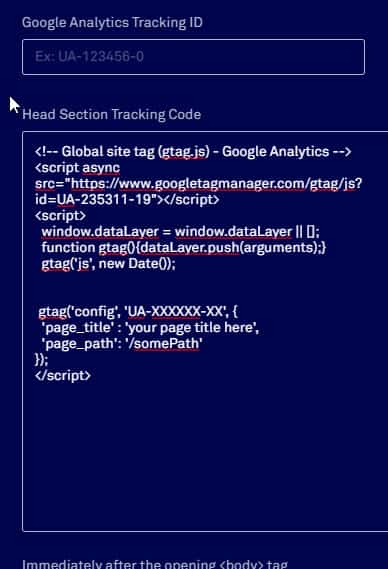
Note this is the new gtag.js code. And here's the code itself to copy and paste: (please note that this is a work in progress, and you might find a better way. SHD makes no guarantees for the code below. Use at your own risk).
<!-- Global site tag (gtag.js) - Google Analytics -->
<script async src="https://www.googletagmanager.com/gtag/js?id=UA-XXXXXX-XX"></script>
<script>
window.dataLayer = window.dataLayer || [];
function gtag(){dataLayer.push(arguments);}
gtag('js', new Date());
gtag('config', 'UA-XXXXXX-XX', {
'page_title' : 'your page title here',
'page_path': '/somePath'
});
</script>
Dr. Wank has been at the helm of Short Hills Design since he founded the company over a decade ago and is the author of the Small Business Web Design Workbook. Dr. Wank currently serves on the editorial advisory board for DentalTown magazine and writes their web development CE course.